Table of Contents
Table of Contents
1Overview
Apache Kafka and Amazon Kinesis are leading data streaming platforms that enable real-time data processing and analytics. While both services handle continuous data flows efficiently, they differ significantly in architecture, performance, management, and cost structure. This analysis provides a detailed comparison to help you choose the right solution for your data streaming needs.
2Core Architecture and Concepts
2.1What is Apache Kafka?
Apache Kafka is an open-source distributed event streaming platform developed by the Apache Software Foundation. Initially created at LinkedIn, Kafka provides a unified, high-throughput, low-latency platform for handling real-time data feeds. Kafka's architecture centers around a distributed commit log, allowing producers to publish data streams to topics that are consumed by subscribers.
2.2What is Amazon Kinesis?
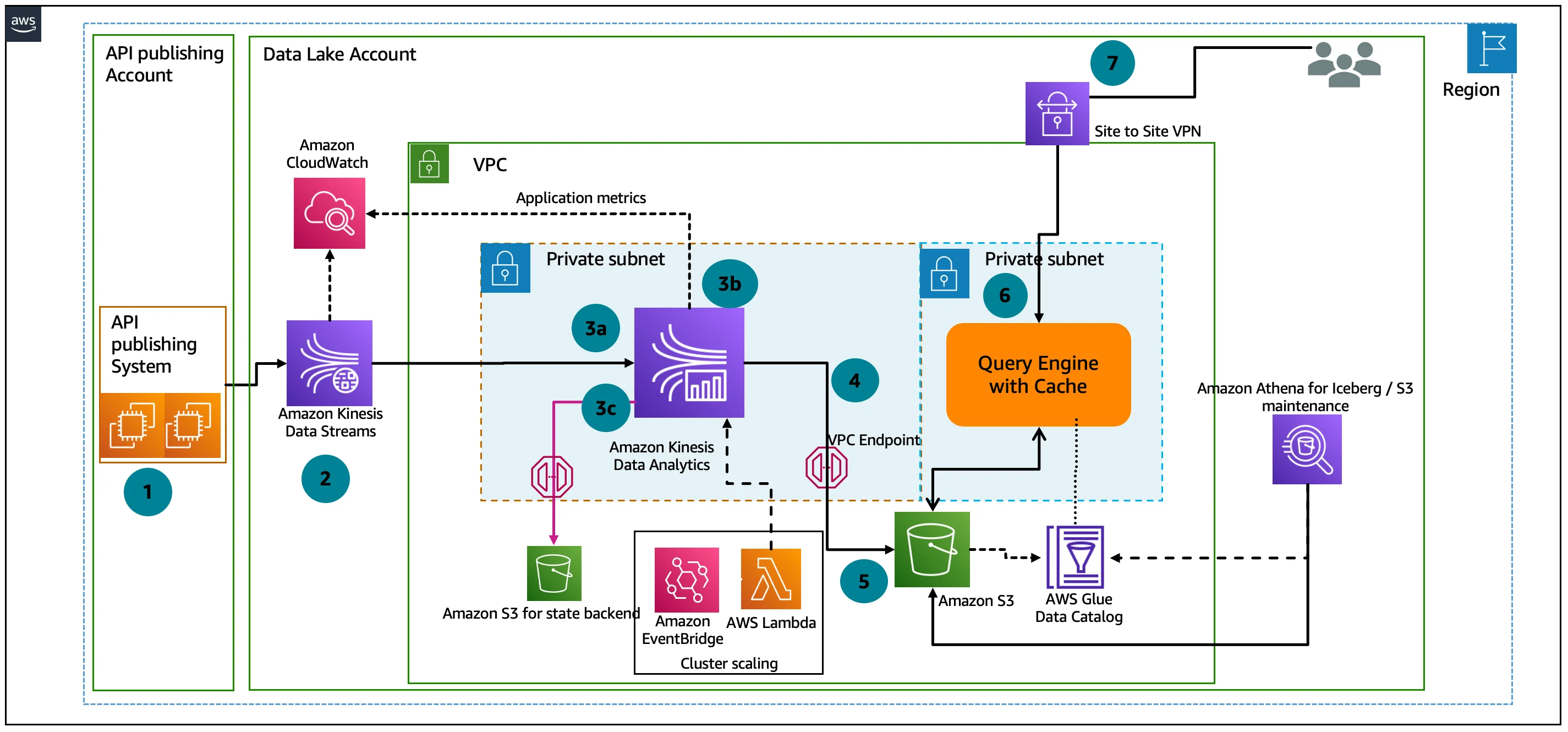
Amazon Kinesis is a fully managed AWS service designed to process and analyze streaming data in real-time. It captures gigabytes of data per second from thousands of sources, including website clickstreams, IoT devices, application logs, and financial transactions. Kinesis synchronously replicates data across three availability zones to ensure durability and availability.
2.3Architectural Comparison
| Feature | Apache Kafka | Amazon Kinesis |
|---|---|---|
| Provider | Apache Software Foundation | Amazon Web Services |
| Core building blocks | Topics and partitions | Streams and shards |
| Scalability unit | Partitions | Shards |
| Data retention | Configurable (unlimited) | Max 365 days |
| Replication | Configurable | Fixed (3 availability zones) |
| Write capacity | ~30K messages/second per partition | 1MB or 1,000 records/second per shard |
| Read capacity | Highly configurable | 2MB or 5 transactions/second per shard |
3Performance and Scalability
3.1Throughput Capabilities
Kafka demonstrates superior raw performance, achieving approximately 30,000 messages per second throughput. This makes it well-suited for high-volume data processing scenarios. Kafka's performance scales linearly with the number of partitions deployed.
Kinesis, while delivering good performance, has more defined limits with each shard handling 1MB/1,000 records per second for writes and 2MB/5 transactions per second for reads. Kinesis can process streaming data in as little as 70 milliseconds from collection to analytics applications.
3.2Scaling Mechanisms
Kafka Scaling: Kafka scales horizontally by adding more brokers and spreading partitions across them, enabling almost limitless capacity expansion. Users can customize Kafka clusters by choosing the number of brokers and instance types, frequently requiring last-minute adjustments for optimal results.
Kinesis Scaling: Kinesis uses shards for parallel processing and scales through adding or removing shards. While it offers auto-scaling capabilities that add shards during usage spikes, resharding temporarily halts data intake for a few minutes and there are limits on the maximum number of shards per stream. This can create bottlenecks at very high data volumes.
4Integration and Ecosystem
4.1Native Integrations
Kafka offers excellent flexibility and works effectively with various systems. However, it requires additional configuration for cloud service integration. Confluent (a commercial Kafka distribution) enhances these capabilities with pre-built connectors.
Kinesis provides seamless integration with AWS services including S3, Lambda, Redshift, and AWS analytics services. This tight AWS ecosystem integration creates a cohesive environment for AWS users, simplifying the development of end-to-end data pipelines.
4.2Development Support
Kafka primarily supports Java SDK, while Kinesis offers broader language support through AWS SDKs including Java, Go, Android, and .NET. This difference in SDK availability may influence technology choices based on existing development environments.
5Management and Operations
5.1Deployment Complexity
Kafka requires significant expertise to deploy and manage effectively. Organizations need dedicated teams to install and manage clusters, configure networking, and monitor performance. Amazon MSK (Managed Streaming for Apache Kafka) and Confluent Cloud offer managed Kafka options that reduce this complexity.
Kinesis is a fully managed service that requires minimal operational overhead. AWS handles infrastructure management, scaling, and maintenance automatically. This allows teams to focus on application development rather than infrastructure management.
5.2Operational Considerations
Kafka Operations:
-
Requires cluster management, networking, and storage configuration
-
Needs continuous monitoring and maintenance
-
Offers greater control and customization options
-
Requires expertise in Kafka architecture
Kinesis Operations:
-
Fully managed by AWS with minimal configuration
-
Automatic scaling within configured limits
-
Limited customization compared to Kafka
-
Lower operational burden but less control
6Security Features
Both platforms provide robust security features but implement them differently:
6.1Authentication and Authorization
Kafka offers highly configurable security with support for SSL/TLS, SASL, and ACLs. Implementation requires substantial engineering resources but provides fine-grained control.
Kinesis leverages AWS IAM for access control, enabling integration with existing AWS security practices. This simplifies security implementation for organizations already using AWS services.
6.2Data Protection
Both platforms support immutability to prevent data modification after writing. Kinesis automatically encrypts data in transit and at rest using AWS KMS, while Kafka requires manual configuration of encryption.
7Cost Structure and Pricing
7.1Pricing Models
| Aspect | Apache Kafka | Amazon Kinesis |
|---|---|---|
| Base cost | Open-source (free) | Pay-as-you-go |
| Infrastructure costs | Self-managed infrastructure | Included in service cost |
| Operational costs | Engineering hours for management | Minimal operational overhead |
| Scaling costs | Hardware + operations | Per-shard cost |
| Example cost | Higher TCO due to management costs | ~$148 for 2MB/s throughput |
7.2Cost Efficiency Factors
Kafka is open-source with no licensing costs, but requires significant operational investment. It becomes cost-effective at large scale when infrastructure utilization can be optimized.
Kinesis offers predictable pricing based on usage with no upfront costs. It's particularly cost-efficient for AWS-centric organizations with moderate streaming needs or companies that prefer operational simplicity over absolute cost optimization.
One Reddit comparison noted that for a 2MB/s stream, Kinesis cost approximately $148 compared to $1365 for Confluent Cloud (managed Kafka). However, Kinesis becomes more expensive when dealing with many small topics since you pay per shard per topic.
8Use Cases and Customer Examples
8.1Ideal Scenarios for Kafka
-
Large enterprises requiring very high throughput
-
Organizations needing extensive customization and control
-
Systems requiring complex stream processing and transformations
-
Cross-platform deployments spanning multiple environments
Uber uses Kafka as a message bus connecting multiple parts of their ecosystem, collecting system and application logs as well as event data from rider and driver apps.
8.2Ideal Scenarios for Kinesis
-
AWS-centric organizations seeking seamless integration
-
Teams preferring managed services with low operational overhead
-
Projects requiring fast time-to-market with minimal setup
-
Applications with moderate throughput requirements
Netflix leverages Kinesis to centralize flow logs for their in-house solution called Dredge, which reads data in real-time to provide a detailed picture of their networking environment.
9Configuration and Best Practices
9.1Kafka Best Practices
-
Set
retriesto instruct producers to retry sending failed messages during broker failover -
Configure
delivery.timeout.msto specify the upper bound for the time between sending a message and receiving acknowledgment -
Set
request.timeout.msto control the maximum wait time for a single request before resending -
Use
acks=allfor high durability -
Implement transaction writes across multiple topics for exactly-once semantics
9.2Kinesis Best Practices
-
Select partition keys that distribute operations evenly across shards
-
Round up to the nearest kilobyte for throughput calculations with single-record operations
-
Validate throughput needs and properly size the number of shards
-
Use enhanced fan-out for high-performance consuming applications
-
Implement proper error handling and retry mechanisms
10Migration Considerations
Organizations considering migration between platforms should evaluate several factors:
Konnect's experience migrating from Kinesis to Kafka highlights some challenges:
-
Kinesis doesn't support transaction writes across multiple topics, making exactly-once semantics impossible
-
Limited Go library options for Kinesis required using Kinsumer
-
Kafka offered better performance for their specific use case
The migration process typically involves:
-
Setting up parallel infrastructure
-
Implementing dual writing to both platforms
-
Gradually shifting consumers to the new platform
-
Validating data consistency before complete cutover
11Conclusion
Both Apache Kafka and Amazon Kinesis offer powerful solutions for real-time data streaming with distinct advantages:
Choose Kafka when:
-
Maximum throughput and performance are critical
-
You need extensive customization and control
-
Your team has Kafka expertise or is willing to invest in it
-
Your architecture spans multiple environments beyond AWS
Choose Kinesis when:
-
You're heavily invested in the AWS ecosystem
-
Operational simplicity is a priority
-
You want predictable, usage-based pricing
-
You need rapid deployment with minimal setup
The decision ultimately depends on your specific requirements, existing infrastructure, team capabilities, and long-term strategy. For AWS-centric organizations with moderate throughput needs, Kinesis offers simplicity and integration. For organizations requiring maximum performance, customization, and scale, Kafka provides unmatched capabilities despite the higher operational complexity.
Still struggling with skyrocketing Kafka bills and the "ops tax" of manual disk management? It's time to stop babysitting your clusters. Try AutoMQ Cloud for Free and experience how diskless architecture slashes costs and automates scaling—no credit card required. See how others made the switch in our case studies or explore the project on GitHub.